
Making of a Modern Software Engineer
AI may loom large, but software engineering jobs still demand diverse skills. Discover the core components of a Modern Software Engineer and how to thrive in today’s tech landscape.

If you recall, 2021–2022 was the golden era for software engineering jobs, peaking in both quantity and prestige. Today, however, the demand for general-purpose software roles has dipped below pre-pandemic levels. If you're hunting for such a job, you're likely facing a daunting list of requirements just to get past the Applicant Tracking System (ATS).
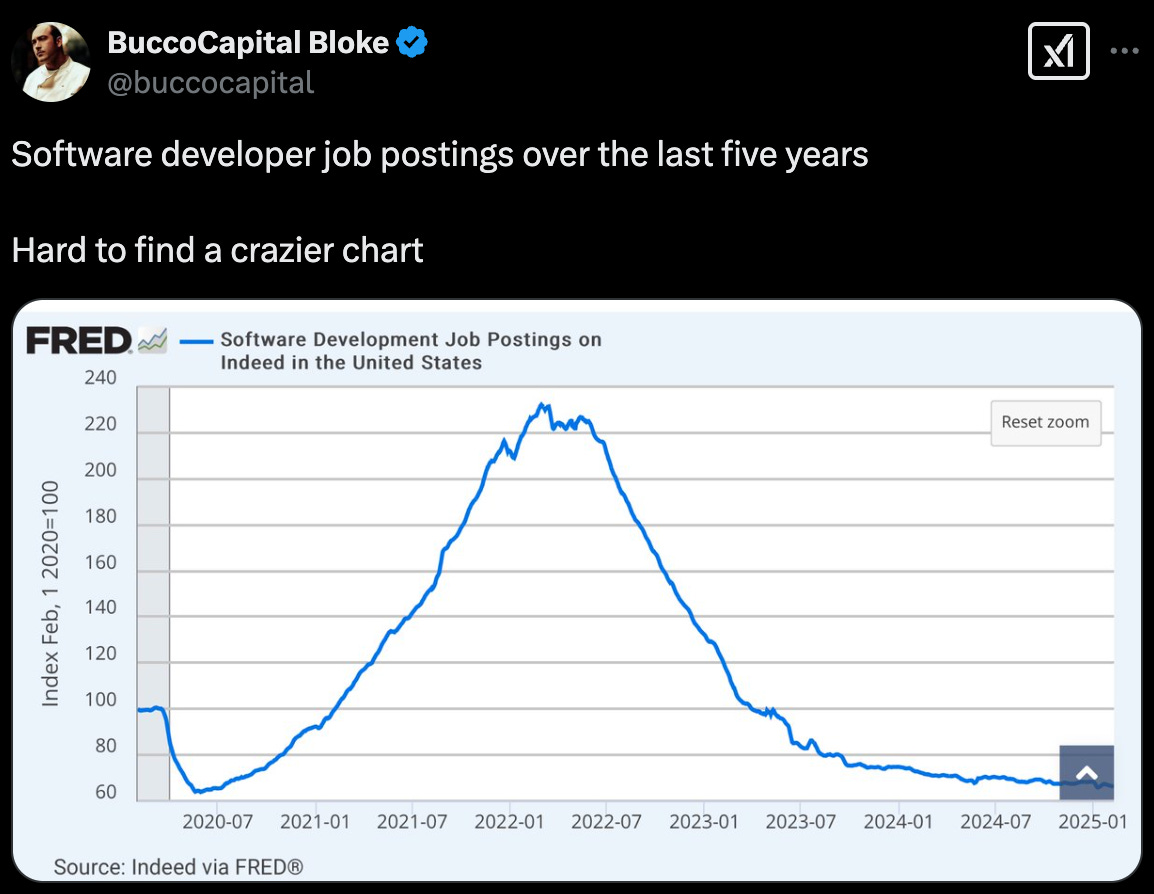
While mastering every skill in a job description is unrealistic, you can familiarize yourself with the key components of a Modern Software Engineer.
Why call it a Modern Software Engineer?
There have been many books and literature describing the software engineering craft. All these books have been in the past when software engineers were kind of domain restricted to electronics and computers. Today almost every field uses software and really you are a domain expert modeling a solution in software. You really need 3-5 core skills from software engineering. Add AI agents and copilots on top of it. You’d be solving domain specific problems. That’s why I call it a Modern Software Engineer.
Modern Software Engineer = (Domain Knowledge) + (3-5 core skills from SWE) + AI copilots
For e.g: Mechanical Engineers graduate and end up writing software for computational fluid dynamics in Ansys. So their software engineers look like:
SWE@Ansys = (CFD knowledge) + ( C/C++, python, CI/CD tools, Docker/Kubernetes)
I feel with the AI coding agents and co-pilot like applications, this is going to be more relevant. The problem is which 3-5 of those skills are relevant? How should you pick them? and what if I want to change jobs and do something new, what are the new 3-5 skills I should work on? To answer this I want to curate a list of skillset that I commonly see in the job postings. Usually it will be your domain specific knowledge plus any combination of 3-5 skills among the curated list.
The Requirement Stack
I would break down the requirements as follows. Some of you might not agree with the categorization but it is just for giving a high level view. Each of these lines are optional depending on your job of interest:
Programming Language: C/C++/Java/rust/go/python/javascript etc
Scripting language: perl, python, bash, batch etc
OS: Linux, Windows, Mac
Hardware Platforms: Intel/AMD x86_64, ARM, PowerPC, nvidia CUDA
Cloud: GCP, AWS, Azure, Oracle, IBM
CI/CD: Jenkins, gitlab
Protocols: TCP/IP, UDP, etc (.. there are a lot of these depending on the domain .. )
Database: SQL, MongoDB etc
Deployment and Scaling: Docker, Kubernetes
Frameworks and Libraries: Nodejs, Angular, React, pytorch, tensorflow, sci-kit learn (… again a huge list but to provide you the flavor …)
Messaging Paradigms: gRPC, kafka, rabitmq, zeromq, mqtt
As you see this is a pretty exhaustive list and being a master of everything is really impossible. Your domain knowledge and the core requirements are the key for the interview but usually if you know the basic concepts about the “additional” requirements and some simple hello world equivalent of them you’d make an impression on the interviewer.
Programming & Scripting Languages
C: https://www.cprogramming.com/tutorial/c-tutorial.html
C++: https://cplusplus.com/doc/tutorial/
Java: https://www.coursera.org/specializations/object-oriented-programming
python:
https://docs.python.org/3/tutorial/index.html
https://realpython.com/ (Some articles are paid, but I found it very good in explaining concepts with examples)
rust: https://doc.rust-lang.org/book/
perl: https://perldoc.perl.org/perl#Tutorials
Operating Systems (OS)
To really know about OS specific behaviors and commands you can read the corresponding manual page. In Linux community it’s called RTFM - Read The F*** Manual. So simply it means search for the corresponding manual page for your operating system and read the usage of the command. I’ll include the links which I usually refer:
Linux: https://www.yolinux.com/
Windows: https://learn.microsoft.com/en-us/windows-server/administration/windows-commands/windows-commands
macOS: https://ss64.com/mac/
Operating Systems Basics: https://pages.cs.wisc.edu/~remzi/OSTEP/
Hardware Platforms
The most common hardware platforms are x86_64 and ARM. These are critical for systems and low-level programming but less so for application-level work, where understanding platform differences can still be beneficial. I typically refer to architecture-specific data sheets and application notes, but I’d welcome suggestions for better guides in the comments.
Cloud
I think everyone by now must be bombarded by the cloud buzzword so I’ll keep the concept short. The basic principle of cloud is that the cloud providers abstract the hardware details for you so that you can consider it like a giant computer accessible over API(s) to perform the task.
If you log in to any of the cloud provider’s dashboard you’ll see tons of services from database, compute, CDN, load balancer, etc. You can pick and choose the services per your project needs. Here are the leading cloud providers:
Google Cloud Platform: https://cloud.google.com/
Amazon Web Services: https://aws.amazon.com/
Microsoft Azure: https://azure.microsoft.com/en-us/
Continuous Integration / Continuous Delivery(CI/CD)
If you’ve read software engineering literature from last few decades there have been lot of different processes for delivering the software. It started from waterfall cycle, V cycle to Agile. Today most of the world follows agile like process, meaning small changes are introduced continuously instead of big breaking change at the end of final delivery. This helps incorporate any customer feedback at early stage.
These processes lead to the need of CI/CD tools. Since the developers are going to push small changes the final deliverable should also be built continuously. If your software consists of many small pieces each written by different teams then they all are built continuously too. Thus they need to be tested if they break anything leading us to continuous integration practices.
Jenkins: https://www.jenkins.io/doc/tutorials/
Gitlab: https://university.gitlab.com/pages/ci-cd-content
There are many other components to CI/CD space like artifact maintenance, test dashboards etc. I have just listed the ones I use. Another notable mention is Github Actions.
Protocols
A protocol is a set of rules that the systems follow to communicate over networks. There are so many protocols and depending on the industry you may be expected to know or would be implementing the protocols.
Common internet protocols: TCP/IP, UDP
Network Engineer: DHCP, DNS, ARP, ICMP, IGMP
Wired: IEEE802.3 Ethernet/ Infiniband
Wireless: WLAN 802.11 / BT 802.15/ LTE/5G (refer 3GPP specs)
Database
Data is central to software applications, requiring storage solutions like relational (e.g., MySQL) or non-relational (e.g., MongoDB) databases. Even if you don’t need deep database knowledge, understanding basic SQL commands is valuable. Try experimenting with SQLite, a lightweight database included with Python.
Deployment and Scaling
Developing is on part of the software engineering part. The deployment to production has been a different ball game all-together. This process was not such a well defined one, lot of documentation and communication (breakdown) went through before a field application engineer or production engineer could deploy the application with correct configuration. Often times various apps deployed on the same server would conflict with their library dependencies. This resulted in containerization of applications. Over the years this field has evolved into DevOps (developer operations)
Docker: Primarily a containerization platform used to package applications and their dependencies into lightweight, portable containers. Docker simplifies the process of creating, deploying, and running applications in isolated environments.
Kubernetes: A container orchestration platform designed for automating deployment, scaling, and management of containerized applications. Kubernetes enables you to manage applications across multiple nodes, providing features such as load balancing, self-healing, and rolling updates.
Libraries, Frameworks and Messaging Paradigms
I won’t go in the specifics of each of these as they’re highly application specific but want to highlight their role in specific job requirements.
Libraries: Think of libraries as collections of pre-written code that you can call upon to perform specific tasks. They offer reusable functionality, saving you from writing everything from scratch. You have control over when and how you use the functions and classes within a library. Examples include utility libraries for string manipulation or date handling, or specialized libraries for tasks like image processing or scientific computation.
Frameworks: Frameworks provide a structural foundation for building an application. They dictate the overall architecture and flow, offering a skeleton that you fill in with your specific code. Unlike libraries where you call specific functions, with frameworks, the framework calls your code at predefined points in its execution cycle. This inversion of control is a key characteristic. Frameworks often come with built-in features and conventions to streamline development for a particular type of application, such as web development (e.g., React, Angular, Django) or mobile development (e.g., SwiftUI, Flutter).
Messaging Paradigms: These define how different parts of a software system communicate with each other by exchanging messages. Instead of direct function calls, components send messages that are then handled by other components. This promotes decoupling and can enable asynchronous communication. Key messaging paradigms include:
Message Queues: Messages are placed in a queue and processed asynchronously by consumers. This ensures reliability and can handle varying loads. Examples include RabbitMQ and Kafka.
Publish/Subscribe: Publishers send messages to a topic without knowing the specific subscribers. Subscribers register their interest in certain topics and receive relevant messages. This enables a more loosely coupled and event-driven architecture.
Request/Reply: One component sends a request to another and waits for a response. This is a common pattern for synchronous communication, often seen in client-server interactions.
A Modern Software Engineer combines domain knowledge, 3–5 core skills from the requirement stack, and AI copilots to tackle domain-specific challenges. This skill set evolves with technology and job demands.
Feel free to suggest additional requirements I may have missed in the comments. I’ll keep this list updated as I explore new technologies.
Thanks for reading Vedhas’s Substack! Subscribe for free to receive new posts and support my work.